PPCine APK

PPCine APK lets you stream and download movies, TV shows, web series, anime, and regional content on Android with easy browsing and entertainment discovery.
PPCine APK is an entertainment application for Android users who want to explore movies, TV shows, web series, and anime through one mobile platform. This online entertainment app offers online video streaming, high-definition playback, and offline downloads. PPCine APK makes your everyday entertainment amazing. You can explore all kinds of TV and movie content under one umbrella. Language-specific content is also available for users who are from different regions. This means you have the option to explore a broad selection of movies, TV shows, and other entertainment. Whether you like action movies or romantic love stories, this platform has something for every taste.
This movie app has a simple and user-friendly interface. This type of interface makes navigation smooth and flexible. This app offers a straightforward way to explore available content. It works smoothly on different kinds of devices, including PCs, smart TVs, and Fire TV Stick.
Online entertainment is a part of every user’s life. TV streaming is now considered old. So people are finding apps that can deliver everything with just one tap. PPCine app is a third-party app. It offers blockbuster movies and binge-worthy TV shows, web series, reality shows, music videos, and sports. You can explore all these things on one app. It does not require account creation.
The content library of this app includes different genres, giving movie buffs and series lovers plenty to discover. If you are looking for an app that offers a convenient way to explore entertainment on mobile, then the PPCine app download is one of the best options for you.
It is the Android app, so it does not work directly on a PC. Follow the guide below to install it on a PC.
Windows PC
- Check whether the app build is compatible with a reputable Android emulator.
- Download the emulator from its official website.
- Install and open the emulator, following its setup instructions.
- Import the verified APK if the emulator supports manual installation.
- Open the application and check whether its basic functions work.
- Search for the application on the internet. There are too many websites.
- Find a trusted website that offers the latest version of the PPCine app espanol.
- Now tap on the big download button that is available on the front page.
- The app is downloading, so you go to Settings.
- It is a third-party app. So go to Settings and enable some permissions.
- Allow all unknown permissions. Now locate the downloaded file in the phone storage.
- Also tap the file to start the installation process. The installation takes a few seconds.
- Search for the app in the app list. Tap to open the app and enjoy endless entertainment on mobile.
Movie Collection
Finding a movie becomes easier when titles are organized in one place. PPCine Mod APK is associated with movie discovery, helping users explore available film information and decide what might suit their mood. It’s pretty handy when you want to find a good movie without spending ages searching different websites.
TV Shows and Series
You can find TV shows and web series together on this app. It includes action, comedy, thriller, horror, and romantic dramas. Different kinds of TV shows are also available. All entertainment is free to watch. You can explore different genres.
Web Series Entertainment
Web series are popular with viewers who enjoy ongoing stories and episode-based entertainment. Some PPCine Free Movie App download pages advertise series alongside movies and television content, but the exact catalog is not independently confirmed across versions. If your build includes these titles, browse the available information first and see what’s worth checking out.
Anime and Animated Content
Anime fans often look for story details, genres, and popular animated titles before choosing their next watch. PPCine Old Version APK brings entertainment-discovery listings that include anime, while streaming availability depends on the particular version. If anime appears in your app, explore the title information and check where the content can legally be watched.
Content Categories
Categories help users sort entertainment into clear groups instead of scrolling through unrelated titles. This feature comes in handy when you already know what kind of story you want and need a quick way to narrow things down.
Genre-Based Browsing
Not sure what to watch tonight? Genre filters can help you explore action, comedy, drama, horror, or thriller titles when those options are available. This streaming app is associated with genre-based discovery in public app listings. It’s an easy-peasy way to narrow your choices without opening every title one by one.
Search Function
Searching by title is useful when you already have a particular movie or show in mind. PPCine APK Download offers search features for finding entertainment by title or genre. Enter a relevant term and review the matching results. No fuss, just a more direct way to find information about something you want to watch.
Simple User Interface
A straightforward interface makes entertainment apps easier for beginners to understand. This app is described in app listings as offering a user-friendly browsing experience, helping users explore titles and their information. The exact layout depends on the version, but clear menus and readable details can make the whole process feel less complicated.
Easy Content Discovery
Sometimes the hardest part is deciding what to watch, not finding a player. The app discovery features can help users explore popular titles, genres, and movie details in one place. This is pretty handy when you’re browsing without a specific title in mind and want to find something interesting without wasting your evening.
Video Playback
Direct playback is an important difference between a streaming app and a movie-discovery app. Some third-party pages advertise PPCine app Download APK for watching movies and shows, but that capability should be checked in the exact build you obtain. If playback is supported, test it with authorized content and check the available controls before settling in.
Video Quality Options
Video quality can affect both picture clarity and data use. Some PPCine-related pages advertise HD playback or quality settings, but these options are not verified for every app using the name. If your version provides a quality selector, choose a setting that suits your screen and internet connection. A stable picture makes for a better viewing session.
Audio Language Options
Audio choices matter when you prefer watching a movie in a particular language. PPCine app APK offers multilingual playback options on certain download pages, but universal audio-track support is not confirmed. Check the title and player settings first. If different tracks are available, select the one that makes the story easiest to follow.
Subtitle Support
Subtitles can help viewers follow dialogue, understand unfamiliar words, or watch quietly without turning up the volume. Some PPCine-related sources advertise subtitle options, but availability can depend on the build and video source. Before starting a long movie, check whether subtitles are offered and whether the language you need is actually available.
Playback Controls
Basic controls such as pause, resume, seeking, and full-screen viewing make video playback easier to manage. PPCine Mod APK streaming builds may provide some of these options, but the exact controls have not been confirmed across releases. If direct playback is available, take a quick look at the player before your binge-watch session begins.
External Video Player Support
Some entertainment apps let users open videos in a separate media player. This can be useful when a preferred player offers familiar controls or works better with a particular device. External player support is not confirmed for every build, so check the actual settings instead of assuming this handy option is included.
Android Device Compatibility
Android phones and tablets can provide a convenient way to explore entertainment while travelling or relaxing at home. PPCine APK download Latest Version is associated with Android installation guides, but compatible system versions and device requirements can differ. Check the file details before installing, and make sure your device has enough storage. A quick check can save unnecessary trouble.
PC and Laptop Use
Using an Android app on a computer can be possible through a compatible emulator, which creates an Android environment on your PC. It works through this method if the build supports it. Install software only from trusted sources, and remember that an emulator does not guarantee successful playback or full compatibility.
Installation Flexibility
Manual installation gives Android users another way to install an app when a compatible, trustworthy APK is available. PPCine Movie App installation requires checking the source, device requirements, and requested permissions before proceeding. This extra care is worth it, especially when download pages show different files or make conflicting claims about the app.
Simple Setup and Getting Started
A clear setup process helps new users understand an app before exploring its features. PPCine APK can be installed by following the steps for the verified file on a compatible Android device. Once installation finishes, review the app’s visible options and test its basic functions. Taking things step by step keeps the process simple and avoids needless hassle.
| Feature | PPCine APK | Netflix | Prime Video | Disney+ / Hotstar | HBO Max |
| Price | Free | Paid | Paid | Paid | Paid |
| Sign-Up | No account required | Required | Required | Required | Required |
| Content | Movies, series, anime | Movies, originals, series | Movies, shows, originals | Disney, Marvel, Pixar | HBO shows, movies |
| Video Quality | HD streaming | Up to 4K | Up to 4K | Up to 4K | Up to 4K |
| Downloads | Available in supported versions | Yes | Yes | Yes | Yes |
| Ads | In-app ads | Plan dependent | Plan dependent | Plan dependent | Plan dependent |
| Device Support | Android devices | Android, iOS, TV, web | Android, iOS, TV, web | Android, iOS, TV, web | Android, iOS, TV, web |
| Content Licensing | Third-party sources | Officially licensed | Officially licensed | Officially licensed | Officially licensed |
PPCine Mod is not available on the Google Play Store. So these tips help you to use this app for a better experience.
Check the APK Source
Download it from a trusted and authentic website. There are huge concerns on the internet about APK apps. Also check the developer’s information and compare the app details.
Verify the File Details
Before downloading the app, you must check the app file size, application name, and version. If any page provides confusing details, then leave it instantly.
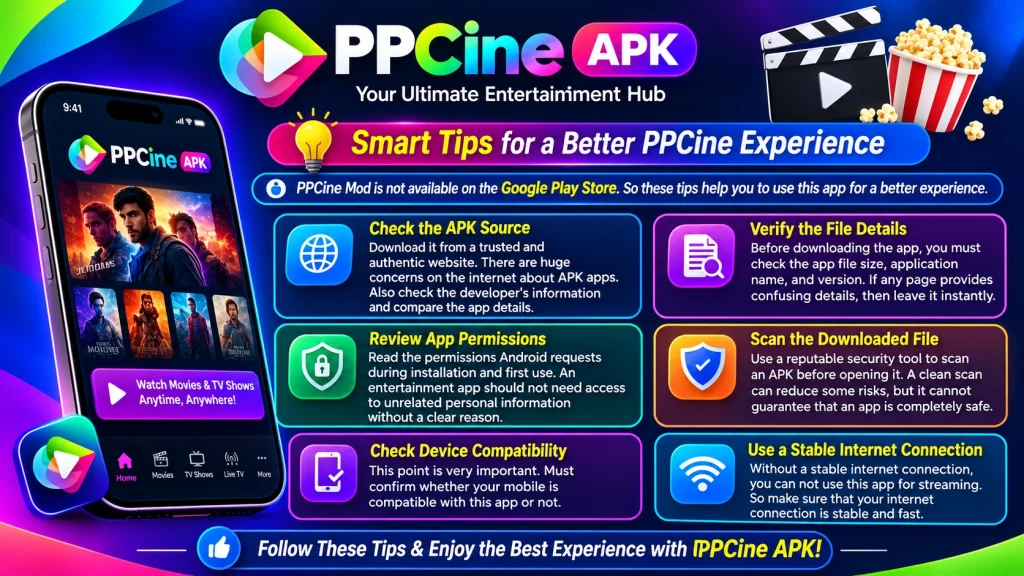
Review App Permissions
Read the permissions Android requests during installation and first use. An entertainment app should not need access to unrelated personal information without a clear reason.
Scan the Downloaded File
Use a reputable security tool to scan an APK before opening it. A clean scan can reduce some risks, but it cannot guarantee that an app is completely safe.
Check Device Compatibility
This point is very important. Must confirm whether your mobile is compatible with this app or not.
Use a Stable Internet Connection
Without a stable internet connection, you can not use this app for streaming. So make sure that your internet connection is stable and fast.
pros
- This entertainment app can make movie discovery more convenient by bringing useful title information together.
- The movie app may help users explore different genres without searching for every title separately.
- Users can check available ratings and release dates before deciding what to watch.
- The browsing experience can help viewers find popular titles and discover something new.
- Its search function can save time when users already know a movie’s name.
- This discovery app can provide cast and crew details where supported.
- Available story summaries help users understand a movie before choosing it.
- Official trailers can offer a quick preview of a title when available.
- The interface is described as user-friendly in public app listings.
Cons
- Third-party APK files can carry security and privacy risks. So visit a trusted website to download and install this app. It is not available on the Google Play Store. It needs manual updates.
- Also, scan the downloaded file with a trusted antivirus because not all APK apps are safe and secure.
PPCine is a wonderful streaming application. It has many entertainment catagories to explore world entertainment. It is a free streaming app. You can download the app for free and also watch premium entertainment without any subscription. Like MovieBox and other movie apps, it is one of the best alternatives. It offers very similar features to these apps. If you like watching entertainment on Mobile without purchasing a subscription, then this app is a great option for you. Always install it from a reliable source.